Mock Servers — Product Documentation
📋 Overview
What Mock Servers Are
Mock Servers let you simulate REST and SOAP APIs without needing the real backend. Teams can:
- Define endpoints with different request/response mappings
- Create multiple mock scenarios for a single endpoint (simulate variants, error codes, edge cases)
- Mock using JSON (REST) or XML (SOAP)
- Configure request bodies, responses, query params, XPath rules, and status codes
- Quickly prototype, test client apps, and validate integrations
🚀 Quick Start
Steps:
- Go to
web.e2etestautomation.comand log in - Navigate to Mock Servers → New Mock Server
- Choose Protocol: REST or SOAP
- Define the endpoint and add Mock Scenarios
- For REST: configure request body, response body, query params
- For SOAP: configure Request Level or XPath Level scenarios with XML
- Save and start the mock server → test from Postman, curl, or your client app
🔑 Core Concepts
- Mock Server – A virtual server hosting mock APIs
- Mock Scenario – A mapping of request → response (with variations). Multiple scenarios can exist for the same endpoint
- REST Mock – JSON request/response with optional query params
- SOAP Mock – XML request/response; supports request‑level or XPath‑level configuration
- Supported Methods – REST (all), SOAP (only GET and POST)
🛠️ Mock Servers by Type
REST Mock Servers
- Request body (JSON) – define expected input
- Response body (JSON) – define what to return
- Query params – simulate different responses for different query params
- Multiple scenarios – each scenario can define different request/response pairs for the same endpoint
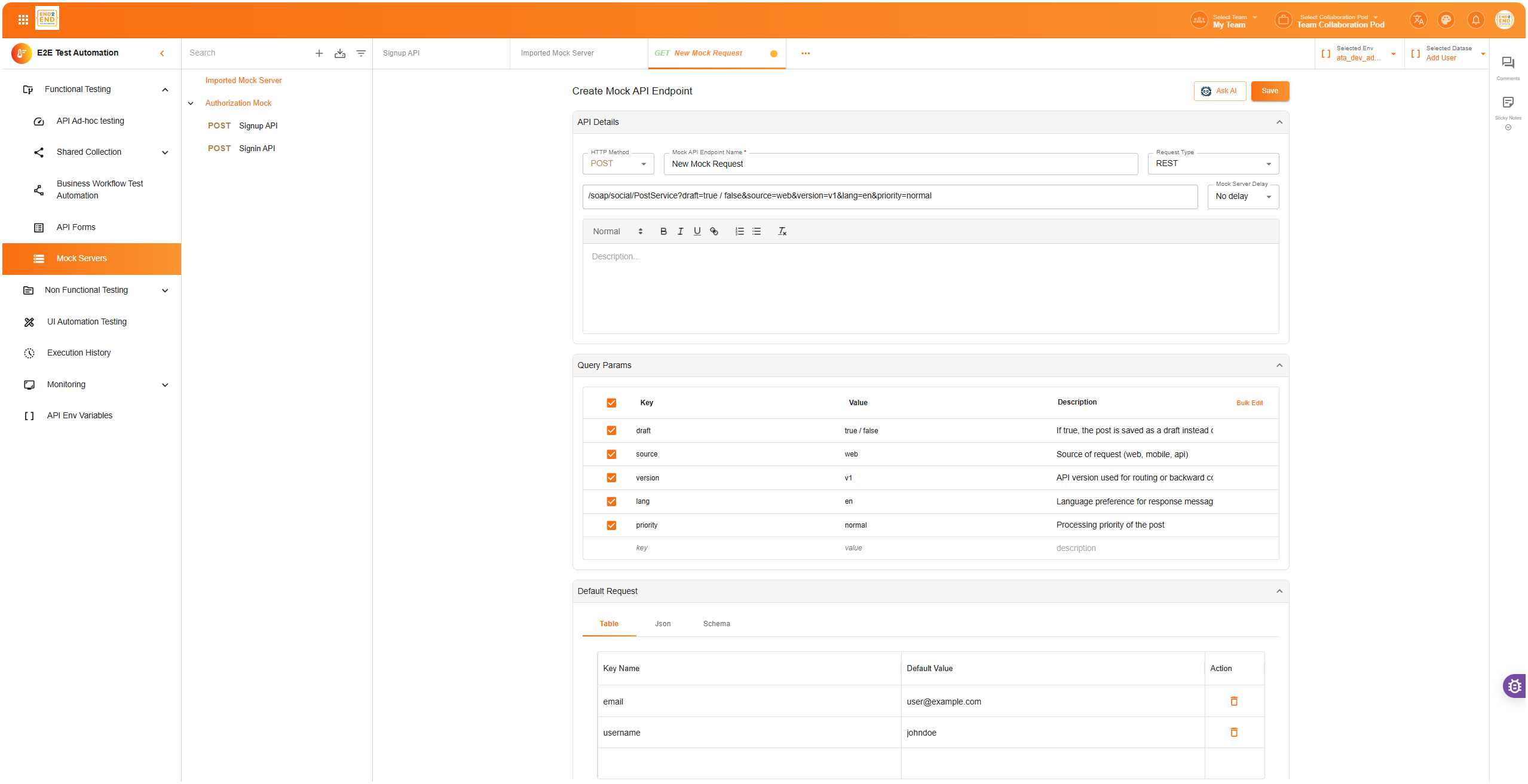
Example REST Mock Scenario:
// Request body
{
  "userId": "123"
}

// Response body
{
  "name": "John Doe",
  "status": "active"
}

// Query param: ?verbose=true
{
  "name": "John Doe",
  "status": "active",
  "details": { "email": "john@example.com" }
}
SOAP Mock Servers
Supports GET and POST only.
Types of SOAP mock scenarios:
1. Request Level
Works on full XML request/response. Example: same request body → different response body/status code.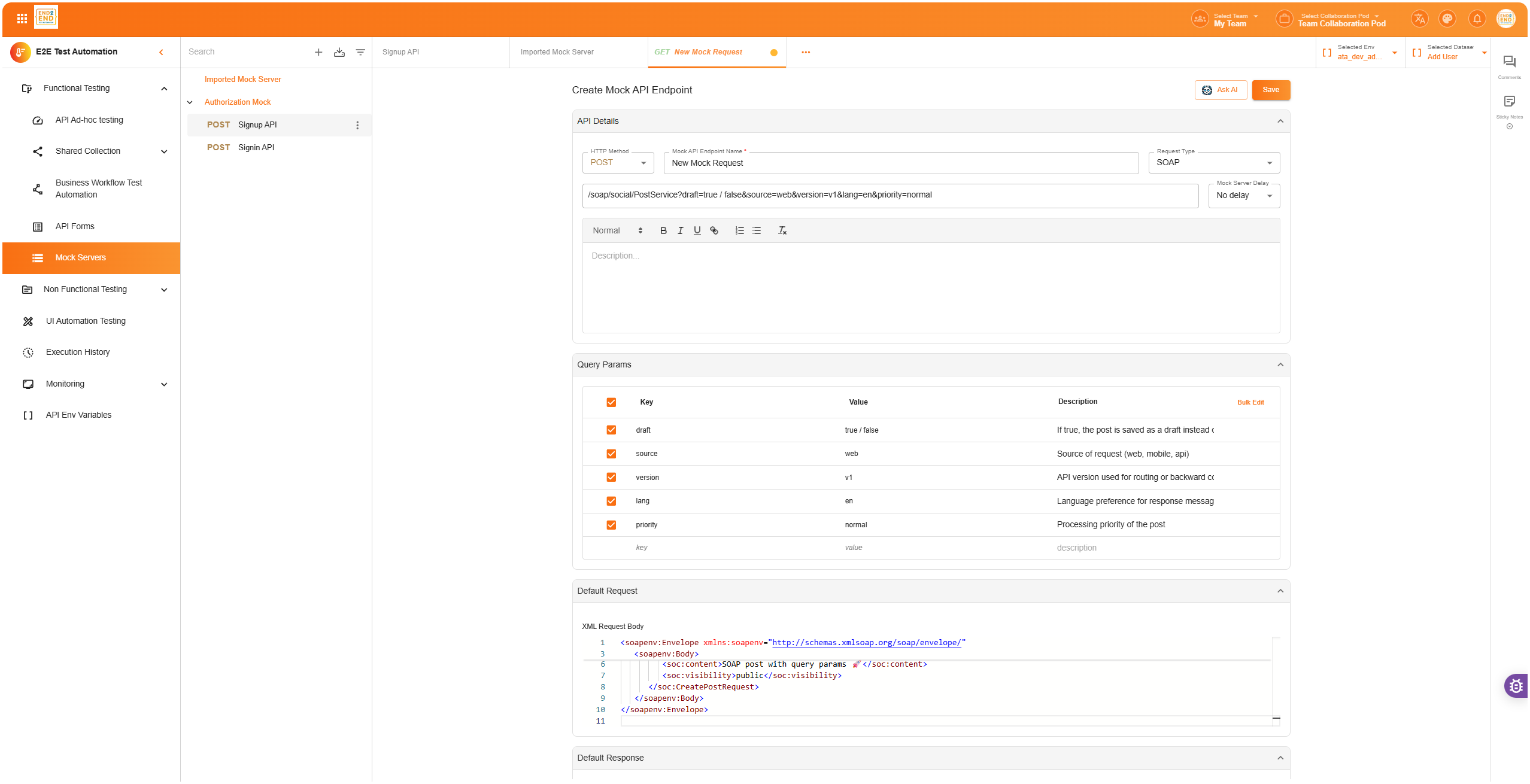
<!-- Request -->
<Envelope>
  <Body>
    <GetUser>
      <UserId>123</UserId>
    </GetUser>
  </Body>
</Envelope>

<!-- Response -->
<Envelope>
  <Body>
    <GetUserResponse>
      <Name>John Doe</Name>
      <Status>Active</Status>
    </GetUserResponse>
  </Body>
</Envelope>
2. XPath Level
Allows conditional mocking based on XPath expressions. Two types:
- XPath Exists → return response if element exists
- XPath Value → return response if element value matches
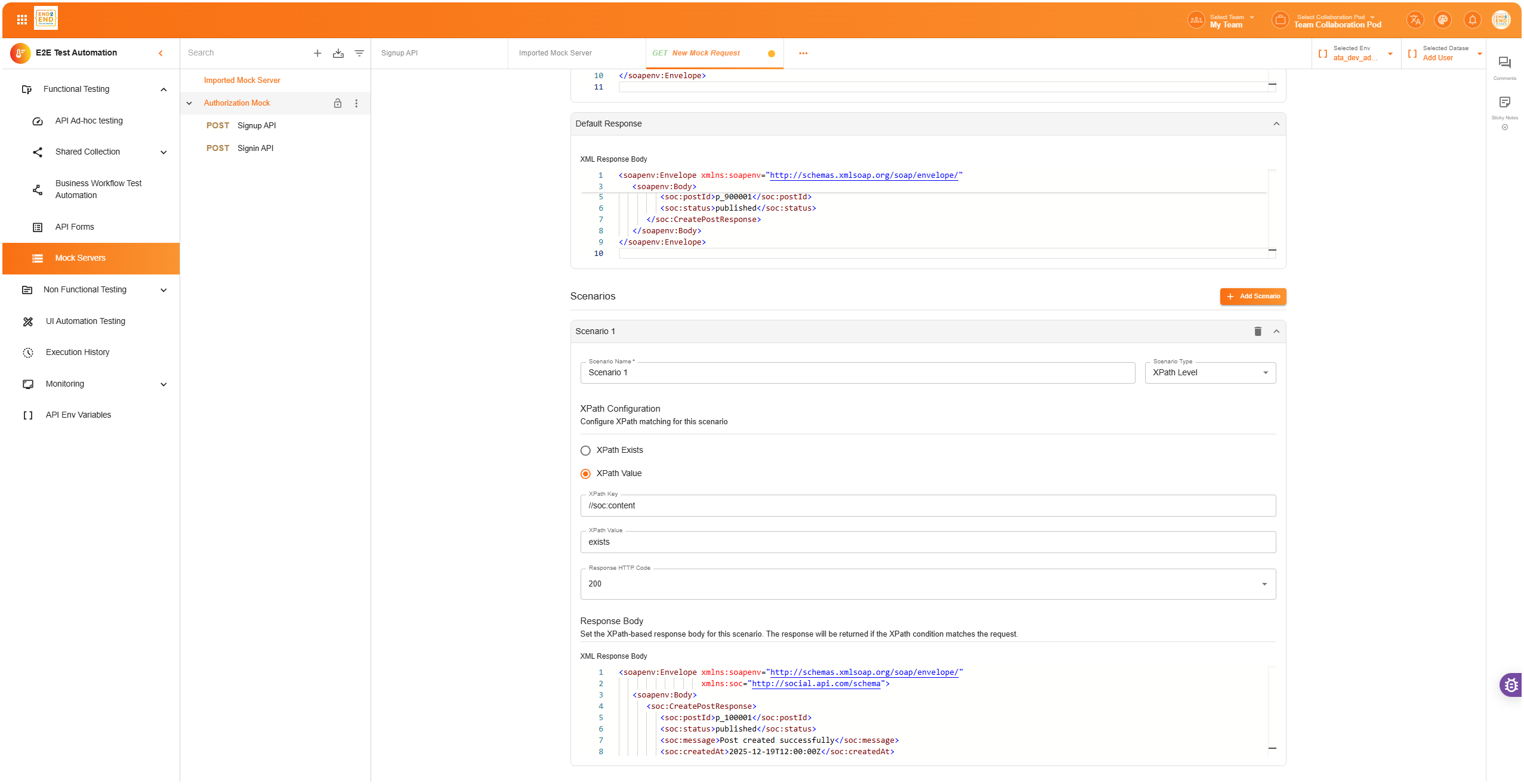
Example (XPath Value):
Rule: //UserId = 123
Response:
<Envelope>
  <Body>
    <GetUserResponse>
      <Name>John Doe</Name>
      <Status>Active</Status>
    </GetUserResponse>
  </Body>
</Envelope>
📝 Mock Scenarios in Detail
Each mock scenario defines:
Request matcher:
- REST → request body (JSON), query params
- SOAP → request body (XML), or XPath rules
Response definition:
- Response body (JSON/XML)
- Status code (200, 400, 500 etc.)
- Optional headers
Variants:
- Create multiple scenarios for the same endpoint to simulate success, error, timeout, or custom flows
📖 Workflow Examples
REST Example
- Endpoint:
POST /users - Scenario 1 → request
{ "userId": "123" }→ response200 { "status": "active" } - Scenario 2 → request
{ "userId": "999" }→ response404 { "error": "Not Found" }
SOAP Example
- Endpoint:
POST /soap/users - Scenario 1 (Request Level): match full request body for
<UserId>123</UserId>→ return200 OKXML - Scenario 2 (XPath Value):
//UserId[text()='404']→ return404 Not FoundXML response
✅ Best Practices
- For REST, keep request/response schemas consistent with your real API
- Use query params to model different filters/states
- For SOAP, prefer XPath Value rules for precise matching
- Limit scenarios to realistic cases (success, common error codes, edge cases)
- Document each scenario (purpose, when to use) for collaboration
🔧 Troubleshooting
- Scenario not matching – Check request body/params vs scenario definition
- SOAP mock not triggering – Ensure method is GET or POST only
- XPath not working – Validate syntax and that XML namespaces are handled correctly
- Multiple matches – The first matching scenario wins → order scenarios carefully
❓ FAQs
Q: Can I create multiple scenarios for the same endpoint? A: Yes, unlimited. Each defines different request/response pairs.
Q: Does E2E Test Automation support PUT/DELETE for SOAP mocks? A: No, only GET and POST.
Q: What format do I use for REST vs SOAP? A: REST → JSON, SOAP → XML.
Q: Can I return different status codes? A: Yes, configure per scenario (e.g., 200, 400, 500).
Q: Which takes priority if multiple SOAP rules match? A: Scenarios are checked in order; the first match wins.
✅ Summary
Mock Servers let you quickly spin up simulated REST and SOAP endpoints with full control over request matching and responses. Perfect for prototyping, testing, and collaboration without relying on live backends.