🌍 Using Environment Variables in API Requests
Environment variables in E2E Test Automation make it easy to manage dynamic values like base URLs, tokens, or session IDs across different environments. By using environment variables in your API requests, you can streamline your configurations and avoid hardcoding values into each request. E2E Test Automation’s variable reference system simplifies switching between environments (Development, QA, Staging, Production) without manually updating each request.
This guide explains how to use environment variables in your API requests and workflows.
🔑 How to Reference Environment Variables
In E2E Test Automation, you can reference environment variables using the {\{variableName\}} notation. This allows E2E Test Automation to automatically substitute the variable with its value from the active environment when you send a request.
Here’s how to use environment variables in different parts of your API requests:
In the URL
Environment variables can be used directly in the URL of your API requests. This allows you to dynamically change parts of the URL depending on the environment you are working with (e.g., Development, Staging, Production).
Example:
If your environment defines: base_url = https://dev.api.example.com
You can reference base_url in the URL as follows:
{\{base_url\}}/users?id=1E2E Test Automation will resolve this to:
https://dev.api.example.com/users?id=1In Headers
Environment variables can also be used in the headers of your API requests, such as for passing authentication tokens or custom header values.
Example:
If your environment defines: access_token = Bearer eyJhbGciOiJIUzI1NiIsInR5cC...
You can reference access_token in the Authorization header like this:
Authorization: {\{access_token\}}E2E Test Automation will replace {\{access_token\}} with the actual token when sending the request, making it easy to switch between different authentication tokens for various environments.
In Request Body
You can use environment variables to populate values in the request body, which is particularly useful when passing dynamic values like session IDs or user information.
Example:
If your environment defines: session_cookie = abc123
You can reference session_cookie in the request body as follows:
{
  "session_id": "{\{session_cookie\}}"
}
E2E Test Automation will automatically replace {\{session_cookie\}} with abc123 when sending the request.
📝 How to Use Environment Variables in API Requests
In URL – Simply type {\{variableName\}} wherever you need to use an environment variable in the URL of the API request. E2E Test Automation will substitute it with the current value of the variable when you send the request.
In Headers – Use {\{variableName\}} in any part of the request headers, such as Authorization, Content-Type, etc. E2E Test Automation will replace the variable with its actual value during execution.
In Body – Use {\{variableName\}} in the request body, especially for POST or PUT requests. E2E Test Automation will insert the correct value based on the environment and send the data accordingly.
🖱️ Auto-Suggest for Environment Variables
E2E Test Automation makes it easy to reference environment variables. When typing {{, E2E Test Automation will automatically display a list of available environment variables based on the currently selected environment. You can then choose the appropriate variable from the list, making it quick and easy to insert variables into your requests.
📖 Example Workflow
Let’s say your environment is set as follows:
base_url = https://dev.api.example.comaccess_token = Bearer eyJhbGciOiJIUzI1NiIsInR5cC...session_cookie = abc123
If your API request is:
- URL:
{\{base_url\}}/booking - Header:
Authorization: {\{access_token\}} - Body:
{ "session_id": "{\{session_cookie\}}" }
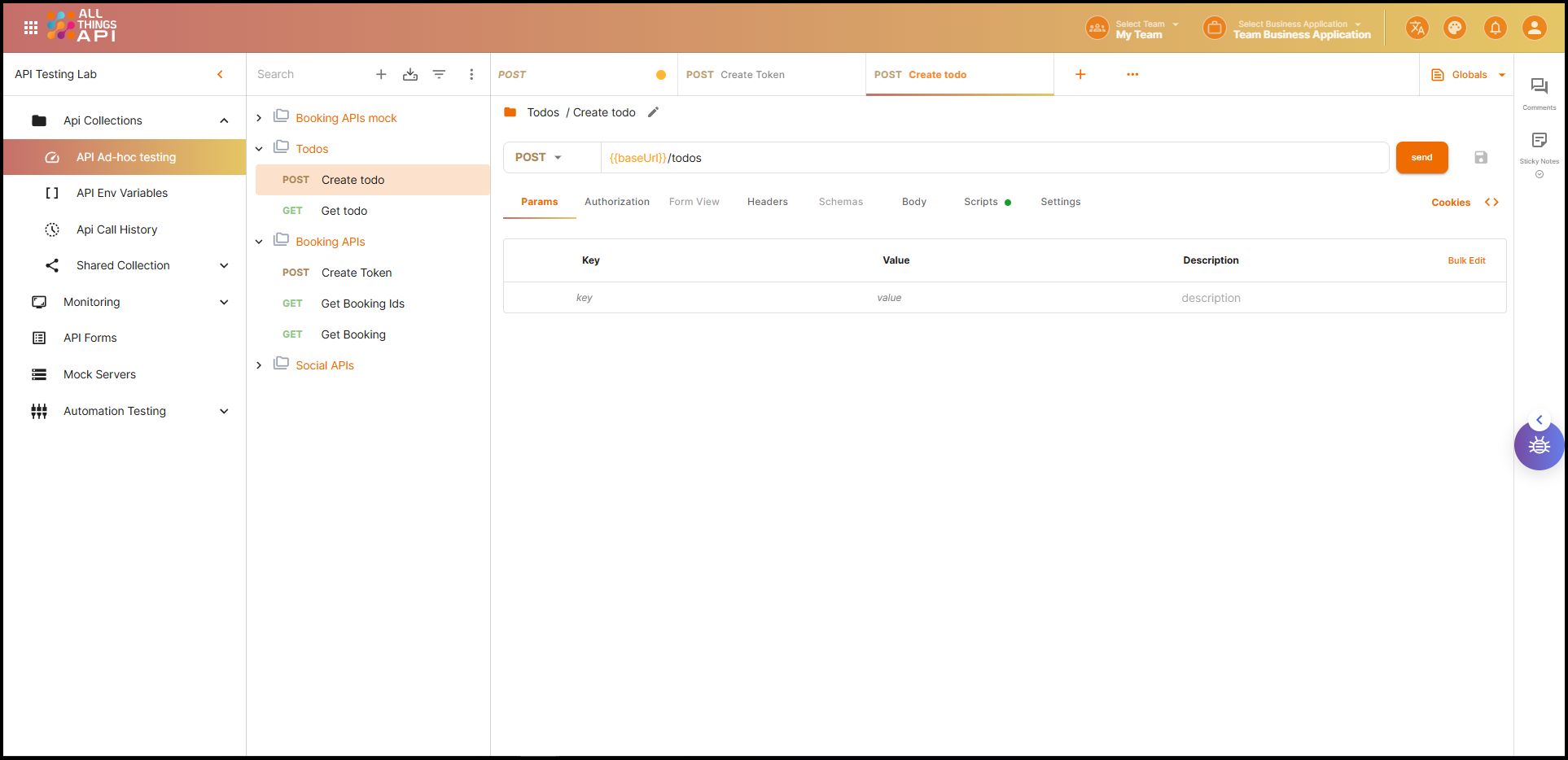
E2E Test Automation will automatically resolve these placeholders when the request is executed, resulting in the following request:
- Resolved URL:
https://dev.api.example.com/booking - Resolved Header:
Authorization: Bearer eyJhbGciOiJIUzI1NiIsInR5cC... - Resolved Body:
{
  "session_id": "abc123"
}
This dynamic approach eliminates the need for manual updates and allows you to easily switch between different environments by simply updating the environment variables.
✅ Summary
Using environment variables in E2E Test Automation’s API requests enables you to:
- Simplify configuration management – No more hardcoding values like URLs or tokens in every request
- Increase flexibility – Switch between environments (Development, QA, Production) without manually updating each request
- Enhance automation – Reduce errors by automating the substitution of dynamic values based on the active environment
By following the {\{variableName\}} format, you can keep your API requests clean, dynamic, and easy to maintain.
Happy testing! 🚀