Business Workflow Test Automation - Overview
What is Business Workflow Test Automation?
Business Workflow Test Automation in E2E Test Automation is a powerful feature that allows you to automate complete business processes end-to-end by connecting both UI and API testing in a single, cohesive workflow. Instead of testing APIs and user interfaces in isolation, you can now validate entire business processes that span multiple systems, services, and user interactions—just as they occur in real-world scenarios.
Think of it as orchestrating a symphony: each instrument (API call, UI interaction, database query, email notification) plays its part at the right time, in the right sequence, creating a harmonious end-to-end business process.
The Problem: Testing in Silos
Traditional testing approaches separate different aspects of your application:
API Testing:
- Tests backend services independently
- Validates data processing and business logic
- Ensures APIs respond correctly
UI Testing:
- Tests user interface interactions
- Validates that users can navigate and interact
- Ensures visual elements work correctly
The Gap:
- No end-to-end validation of complete business processes
- Missing integration points between UI and API
- Cannot test realistic scenarios that span multiple systems
- Difficult to validate multi-step workflows that involve different technologies
- Time-consuming to manually coordinate different test types
Real-World Example:
A complete e-commerce order process might involve:
- User searches for product (UI interaction)
- System queries product database (API call)
- User adds item to cart (UI interaction)
- Cart service updates (API call)
- User proceeds to checkout (UI interaction)
- Payment service processes payment (API call)
- Order service creates order (API call)
- Email notification sent (Email service)
- User sees confirmation (UI validation)
Testing each piece separately misses critical integration points where things often break.
The Solution: Business Workflow Test Automation
Business Workflow Test Automation bridges this gap by allowing you to:
Connect Multiple Testing Types:
- Combine UI automation with API testing in one workflow
- Add database queries to validate data
- Include email notifications and validations
- Integrate external service calls
- Coordinate timing and dependencies
Model Real Business Processes:
- Represent actual business workflows visually
- Include conditional logic and branching
- Handle timeouts and asynchronous operations
- Validate data flows between systems
- Ensure end-to-end process integrity
Automate Complex Scenarios:
- Multi-step approval processes
- Order fulfillment workflows
- User registration and verification
- Payment processing with notifications
- Data synchronization across systems
Key Concepts
Workflows
A workflow is a visual representation of your business process, consisting of connected nodes that execute in sequence or based on conditions.
Components of a Workflow:
- Nodes: Individual steps in the workflow (API calls, UI tests, conditions, etc.)
- Connections: Links between nodes that define the execution flow
- Variables: Data passed between nodes
- Conditions: Logic that determines which path to take
- Scripts: Custom logic executed before or after node execution
Example Workflow:
Start
  ↓
[UI Test: User Login]
  ↓
[HTTP Request: Get User Profile]
  ↓
[Conditional: Check Account Status]
  ├─ Active → [Continue to Dashboard]
  └─ Inactive → [Send Activation Email]
Nodes
Nodes are the building blocks of workflows. Each node represents a specific action, test, or decision point in your business process.
Available Node Types:
- Simple Conditional - Basic if/then logic
- Event Conditional - Time-based conditional logic
- Signal - Trigger signals to coordinate workflows
- Wait Activity - Pause execution for a specified duration
- HTTP Request - Make API calls
- Compliance Approval - Send approval emails with timeout
- External TC Execution - Execute external test cases via webhook
- SES Email - Send emails using AWS SES
- UI Test - Execute UI automation scenarios
- Database - Run database queries
- Loop Over Items - Repeat actions multiple times
Each node type serves a specific purpose in orchestrating your business workflow.
Node Configuration
Every node in the workflow has three configuration tabs:
Parameters Tab:
- Node-specific settings and inputs
- Configuration required for the node to execute
- Varies by node type
Pre-Script Tab:
- JavaScript code executed before the node runs
- Used for setup, data preparation, or validation
- Can set variables, manipulate data, or add conditional logic
Post-Script Tab:
- JavaScript code executed after the node completes
- Used for validation, data extraction, or cleanup
- Can capture results, set variables, or perform assertions
Variables and Inputs
Workflows use variables to pass data between nodes:
Variable Syntax:
${inputs.variable1}
${inputs.userId}
${inputs.orderTotal}
${inputs.confirmationEmail}
Use Cases:
- Pass data from one node to another
- Use API response values in subsequent UI tests
- Store extracted data for later validation
- Share configuration across multiple nodes
Example:
Node 1: HTTP Request - Create User
  Post-Script: Extract userId from response
  Variable: ${inputs.userId}

Node 2: UI Test - Login with New User
  Parameters: Use ${inputs.userId} in login form

Node 3: HTTP Request - Get User Profile
  Parameters: Use ${inputs.userId} in API endpoint
The Workflow Interface
Business Workflow Test Automation provides two main views:
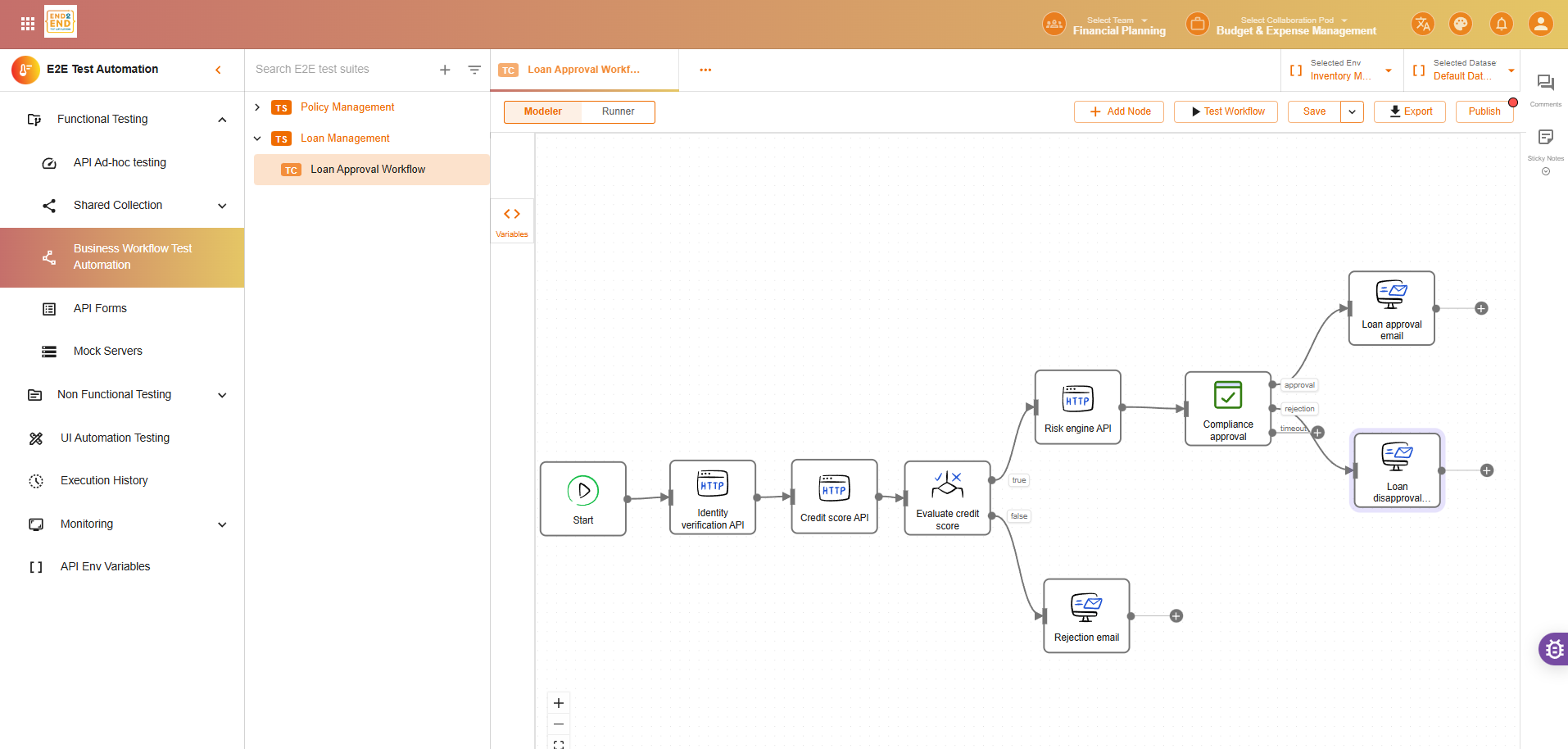
1. Modeler
The Modeler is the visual workflow designer where you create and configure your workflows.
Features:
- Visual canvas for designing workflows
- Drag-and-drop interface for adding and connecting nodes
- Node library with all available node types
- Connection tools for linking nodes together
- Properties panel for configuring selected nodes
- Zoom and pan for working with large workflows
- Save and version control for workflow management
Workflow Creation Process:
- Open the Modeler
- Drag nodes onto the canvas
- Configure each node (parameters, scripts)
- Connect nodes to define flow
- Add conditionals and loops as needed
- Validate the workflow
- Save and test
2. Runner
The Runner is where you execute workflows and monitor their progress.
Features:
- Execution controls (start, stop, pause)
- Real-time progress tracking showing which node is executing
- Run history with all past executions
- Detailed logs for each node execution
- Variable inspection to see data flow
- Error reporting with stack traces and context
- Performance metrics (execution time per node, total workflow time)
Execution Monitoring:
- See which node is currently executing
- View node status (pending, running, completed, failed)
- Inspect variables and outputs in real-time
- Access logs for troubleshooting
- Track overall workflow progress
How Business Workflows Work
Execution Flow
- Workflow Starts:
- Initial node begins execution
- Variables are initialized
- Pre-scripts run if configured
- Node Execution:
- Pre-script executes (if defined)
- Node performs its action (API call, UI test, etc.)
- Post-script executes (if defined)
- Results and variables are captured
- Flow Control:
- Conditionals evaluate and determine next path
- Loops iterate as configured
- Signals coordinate between parallel paths
- Wait activities pause execution as needed
- Data Flow:
- Variables pass data between nodes
- Outputs from one node become inputs to another
- Scripts can manipulate and validate data
- State is maintained throughout execution
- Workflow Completion:
- Final node completes
- Overall status is determined (success/failure)
- Results and logs are saved
- Notifications sent if configured
Conditional Execution
Workflows can branch based on conditions:
Example:
[HTTP Request: Check Inventory]
  ↓
[Simple Conditional: Stock Available?]
  ├─ True → [HTTP Request: Process Order]
  └─ False → [SES Email: Notify Out of Stock]
Sequential and Parallel Execution
Nodes can execute:
Sequentially:
- One after another in order
- Each waits for the previous to complete
- Most common execution pattern
In Parallel (with proper setup):
- Multiple branches execute simultaneously
- Use signals to coordinate and merge results
- Efficient for independent operations
Use Cases for Business Workflow Test Automation
1. E-commerce Order Processing
Workflow:
1. UI Test: User searches and adds product to cart
2. HTTP Request: Verify cart contents via API
3. UI Test: User proceeds to checkout
4. HTTP Request: Validate shipping options
5. UI Test: User enters payment information
6. HTTP Request: Process payment via payment gateway
7. HTTP Request: Create order in order service
8. Database: Verify order stored correctly
9. SES Email: Send confirmation email
10. UI Test: Verify confirmation page displays
What It Validates:
- Complete user journey works end-to-end
- Data flows correctly between UI and backend
- Payment processing integrates properly
- Order is created and stored correctly
- Customer receives confirmation
2. User Registration and Onboarding
Workflow:
1. UI Test: User fills registration form
2. HTTP Request: Create user account via API
3. Database: Verify user record created
4. SES Email: Send verification email
5. Wait Activity: Simulate email delivery delay
6. UI Test: User clicks verification link
7. HTTP Request: Activate account via API
8. Database: Verify account status updated
9. UI Test: User completes profile setup
10. HTTP Request: Get complete user profile
What It Validates:
- Registration form works correctly
- Account is created in database
- Email verification flow functions
- Profile setup completes successfully
- User data is consistent across systems
3. Multi-Step Approval Process
Workflow:
1. HTTP Request: Submit request for approval
2. Database: Store request details
3. Compliance Approval: Email to first approver
4. Event Conditional: Wait for approval (timeout: 2 days)
5. Simple Conditional: First approval granted?
   ├─ Yes → Continue
   └─ No → [SES Email: Notify rejection]
6. Compliance Approval: Email to second approver
7. Event Conditional: Wait for approval (timeout: 2 days)
8. Simple Conditional: Second approval granted?
   ├─ Yes → [HTTP Request: Process approved request]
   └─ No → [SES Email: Notify rejection]
9. Database: Update request status
10. SES Email: Notify requester of final decision
What It Validates:
- Approval routing works correctly
- Timeouts function as expected
- Each approval level is enforced
- Notifications are sent appropriately
- Request status is tracked accurately
4. Payment Processing with Reconciliation
Workflow:
1. HTTP Request: Initiate payment
2. Wait Activity: Simulate processing delay
3. HTTP Request: Check payment status
4. Loop Over Items: Retry check up to 5 times
5. Simple Conditional: Payment successful?
   ├─ Yes → Continue
   └─ No → [Signal: Trigger refund workflow]
6. Database: Log transaction
7. HTTP Request: Update order status
8. SES Email: Send payment confirmation
9. UI Test: Verify receipt page
What It Validates:
- Payment gateway integration works
- Retry logic handles delays
- Transaction logging is accurate
- Order status updates correctly
- Customer receives confirmation
5. Data Synchronization Workflow
Workflow:
1. HTTP Request: Fetch data from source system
2. Database: Store data in staging table
3. Loop Over Items: Process each record
   └─ For each record:
      a. Simple Conditional: Validate data format
      b. HTTP Request: Transform data via service
      c. Database: Insert into target table
      d. Signal: Increment success counter
4. Database: Run data validation queries
5. SES Email: Send summary report
What It Validates:
- Data extraction works correctly
- Each record is processed
- Data transformation is accurate
- Target database is updated
- Data integrity is maintained
Benefits of Business Workflow Test Automation
1. Complete End-to-End Testing
Before:
- API tests validate backend
- UI tests validate frontend
- Gap between them
With Workflows:
- Test entire business process
- Validate data flow across systems
- Ensure UI and API work together
- Catch integration issues
2. Realistic Test Scenarios
Before:
- Tests are artificial and isolated
- Don’t reflect real user journeys
- Miss timing and coordination issues
With Workflows:
- Tests mirror actual business processes
- Include real-world timing and dependencies
- Validate complete user experiences
- Test asynchronous operations
3. Reduced Manual Testing
Before:
- Complex scenarios require manual coordination
- QA manually chains different tests
- Time-consuming and error-prone
With Workflows:
- Automated end-to-end execution
- No manual intervention needed
- Consistent execution every time
- Faster regression testing
4. Better Test Coverage
Before:
- Hard to test complex multi-step processes
- Integration points often untested
- Edge cases in workflows overlooked
With Workflows:
- Easy to model complex processes
- All integration points tested
- Conditional paths validated
- Comprehensive coverage
5. Faster Feedback
Before:
- Separate tests take longer to run
- Results come from different tools
- Hard to correlate failures
With Workflows:
- Single execution tests everything
- Immediate feedback on business process health
- Clear failure points
- Quick root cause identification
6. Improved Collaboration
Before:
- Developers test APIs
- QA tests UI
- Business logic split between teams
With Workflows:
- Visual workflows everyone understands
- Business processes clearly represented
- Shared understanding of testing
- Cross-functional collaboration
7. Maintenance Efficiency
Before:
- Update API tests
- Update UI tests separately
- Keep them synchronized manually
With Workflows:
- Update workflow once
- Changes propagate through the flow
- Single source of truth
- Easier maintenance
Getting Started
Prerequisites
Before creating business workflows:
- API collections ready for testing
- UI test scenarios created and working
- Test data prepared
- Authentication configured for services
- Database access if needed
- Email service configured if sending emails
First Workflow
Start Simple:
- Choose a basic business process (e.g., user login)
- Identify the steps (UI login + API validation)
- Create workflow in Modeler
- Add and configure nodes
- Connect nodes
- Test and validate
Expand Gradually:
- Add more steps
- Include conditionals
- Add error handling
- Incorporate notifications
- Test edge cases
Best Practices
Design Workflows:
- Model actual business processes
- Keep workflows focused and logical
- Use clear, descriptive node names
- Document complex conditionals
- Plan error handling
Configure Nodes:
- Set appropriate timeouts
- Add meaningful pre/post-scripts
- Validate data at each step
- Use variables effectively
- Handle edge cases
Test Workflows:
- Test each node individually first
- Validate the complete flow
- Test error scenarios
- Verify data flow
- Check timing and coordination
Maintain Workflows:
- Update when business processes change
- Keep documentation current
- Review and optimize regularly
- Archive obsolete workflows
- Version control workflows
Components Overview
Modeler Components
- Canvas: Visual workspace for building workflows
- Node Library: Available node types to add
- Properties Panel: Configure selected node
- Connection Tools: Link nodes together
- Toolbar: Save, validate, run controls
Runner Components
- Execution Status: Current workflow state
- Node Progress: Which nodes completed/failed
- Variable Inspector: View data flow
- Logs Panel: Detailed execution logs
- History: Past workflow executions
- Metrics: Performance data
Summary
Business Workflow Test Automation in E2E Test Automation enables you to:
- Automate complete business processes end-to-end
- Combine UI and API testing in single workflows
- Model real-world scenarios with conditional logic
- Validate data flow across multiple systems
- Test integration points between services
- Coordinate timing with waits and events
- Handle approvals and notifications automatically
- Monitor execution in real-time
- Maintain comprehensive logs for troubleshooting
By bridging the gap between UI and API testing, Business Workflow Test Automation ensures that your application works correctly not just in individual components, but as a complete, integrated system that delivers value to your users.
From isolated tests to integrated workflows—test what matters: your complete business processes.